
The more conversations I have with customers about AI strategy, the more often the same question comes up:
Should we be using Copilot Studio or Azure AI Foundry?
As AI agents continue to evolve, from simple chatbots to fully capable digital workers, Microsoft now offers two complementary platforms for building them: Microsoft Copilot Studio and Azure AI Foundry. Both are powerful, both support the creation of copilots and intelligent agents, and both sit firmly within Microsoft’s broader AI ecosystem, but they are built for different users, scenarios, and levels of complexity.
If you’re trying to decide where to begin, or whether a combination of both platforms is the right approach, this article aims to clarify the key differences, strengths, and best‑fit scenarios for each.
What Is Copilot Studio?
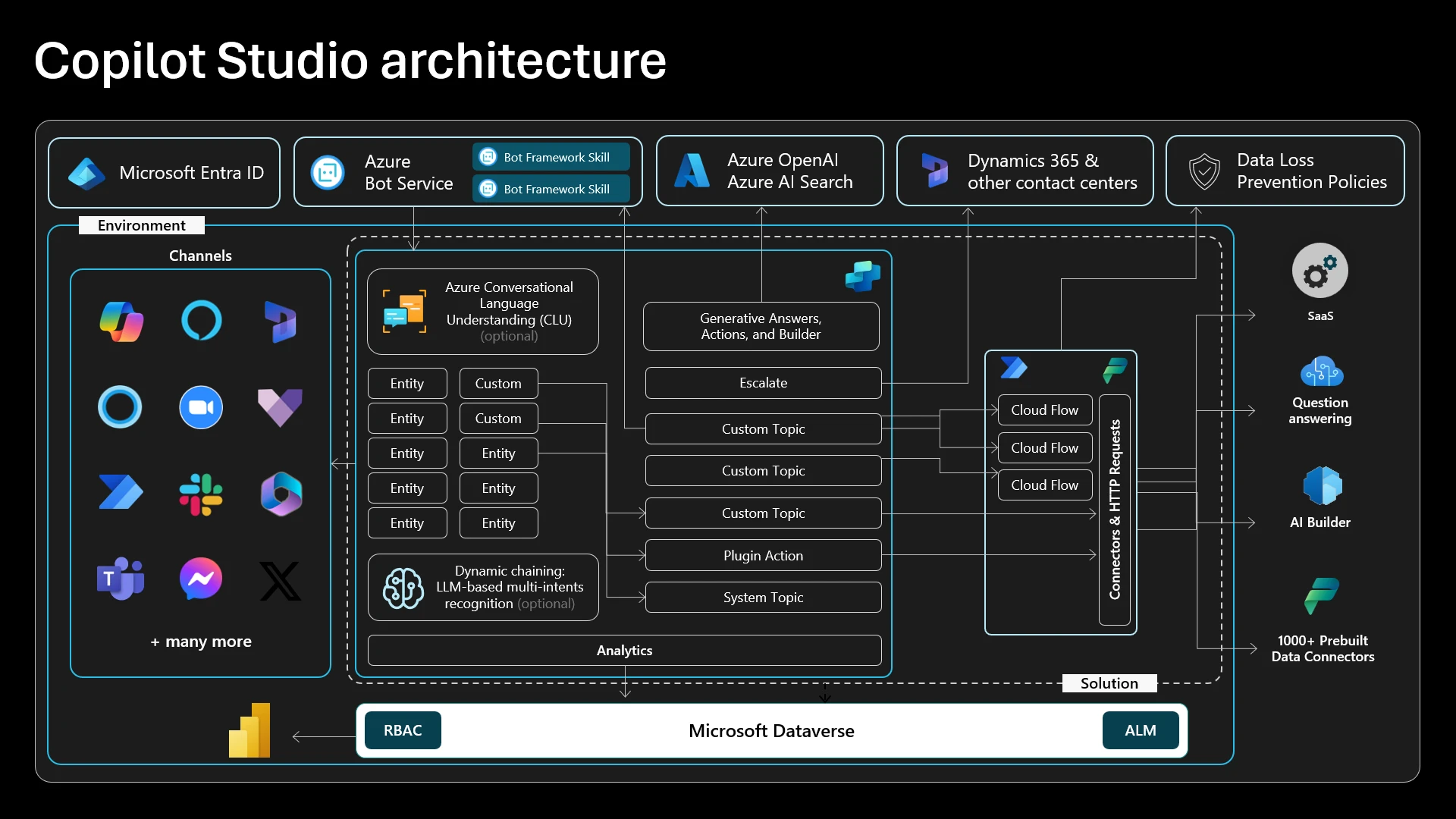
Microsoft Copilot Studio is a low‑code, SaaS-based platform designed for business teams, IT admins, and “pro‑makers” who want to build AI agents quickly with minimal development overhead. It offers a visual canvas for conversation design, automation, connectors, and publishing directly into Microsoft 365 experiences.
Key facts:
- Built for business domain experts and IT pros, not developers.
- Delivered as fully managed SaaS with no infrastructure to maintain.
- Provides native integration with Microsoft 365, Graph, SharePoint, Power Platform, and Dataverse.
- Includes enterprise-grade compliance like Entra ID SSO, DLP, Purview, and governance controls.
- Publishes to channels including Teams, Outlook, and web apps.
What Is Azure AI Foundry (formerly Azure AI Studio / Microsoft Foundry)?
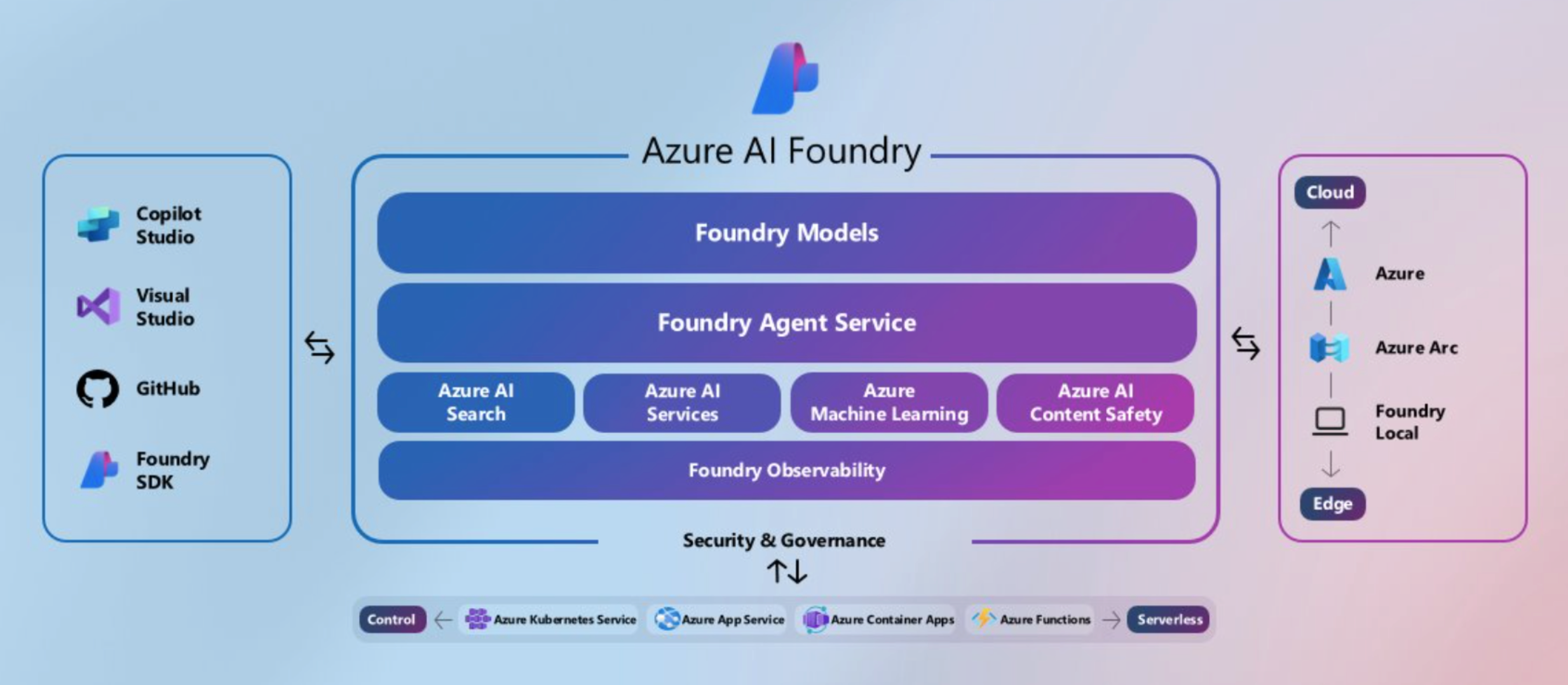
Azure Foundary is Microsoft’s secure, flexible platform for designing, customising, and managing AI apps and agents. It’s a developer-first, code-centric platform for building sophisticated AI applications, scalable agents, and domain-specific solutions using Azure’s full cloud ecosystem.
Key facts:
- Built for professional developers, software engineers, and data scientists.
- Runs in your own Azure subscription, offering full control of compute, networking, storage, and data residency.
- Provides access to frontier, open-source, and fine‑tunable models with full RAG stack support.
- Deep integration with Azure services including Blob Storage, Data Lake, Fabric, Cosmos DB, AKS, Functions, Key Vault, and VNet isolation.
- Supports CI/CD, DevOps, MLOps, A/B testing, advanced evaluation, and observability.
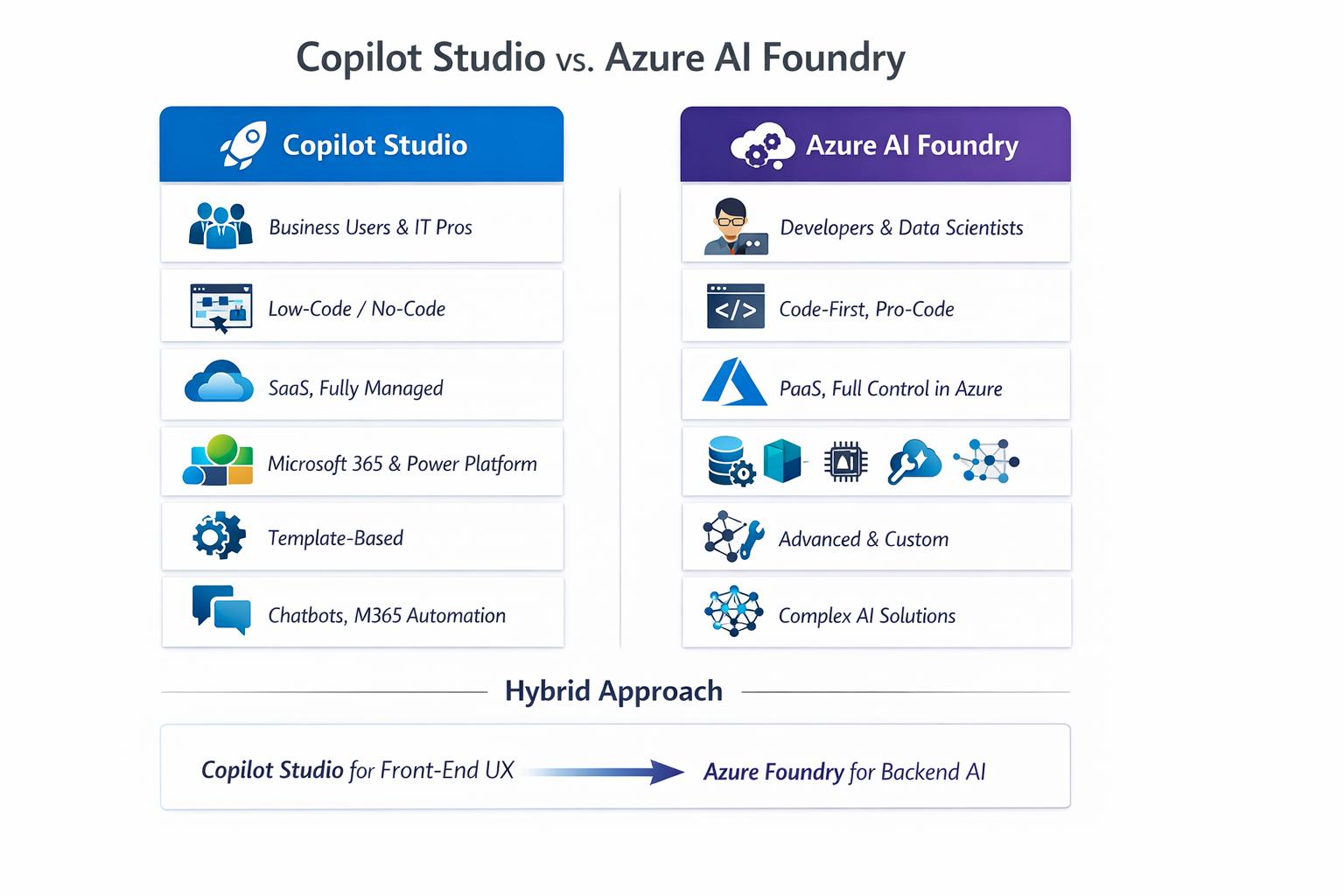
Core Differences at a Glance
When Should You Use Copilot Studio?
Copilot Studio shines when business users need to build solutions quickly with minimal code, especially where Microsoft 365 data is central.
Best for:
- Employee self-service bots (HR, IT helpdesk, onboarding).
- Customer service chatbots integrated with Teams or websites.
- Process automation using Power Automate flows.
- Knowledge assistants grounded in SharePoint, OneDrive, or Graph data.
- Rapid prototyping of conversational agents for business units.
Why choose it: Fast time-to-value, strong governance, low skill barrier, and native collaboration within Microsoft 365.
When Should You Use Azure AI Foundry?
Azure AI Foundry excels in enterprise‑grade, custom, or deeply integrated AI projects where development teams require maximum control.
Best for:
- Domain-specific AI models with fine-tuning (e.g., financial, medical, manufacturing).
- Sophisticated multi-agent systems and orchestration.
- RAG applications over large unstructured datasets (Azure Search, vector DBs).
- Enterprise apps needing private networking, VNet isolation, or custom APIs.
- High-performance, scalable AI solutions running on AKS, containers, or custom infrastructure.
Why choose it: Full control, maximum extensibility, and tooling for developers and data scientists.
Can You Combine Both?
In short, yes. Many organisations use Copilot Studio + Azure AI Foundry together, depending on project needs:
- Build front-end conversational UX in Copilot Studio.
- Implement complex back-end reasoning, data pipelines, or custom tools in Azure AI Foundry.
- Connect them using API plugins, MCP servers, or Azure Functions.
Microsoft explicitly states the platforms “work together beautifully.”
Choosing the Right Platform: A Simple Decision Guide
| If your priority is… | Choose |
|---|---|
| Fast deployment with minimal code | Copilot Studio |
| Deep 365 integration (Teams, SharePoint) | Copilot Studio |
| Full control of data, models, networking | Azure AI Foundry |
| Custom multi-agent orchestration | Azure AI Foundry |
| Business-led automation & prototyping | Copilot Studio |
| Enterprise-grade scalability & DevOps | Azure AI Foundry |
| A hybrid approach (polished UX + powerful backend) | Both |
Conclusion
Copilot Studio and Azure AI Foundry are not competitors, they’re complementary platforms that serve different parts of the AI development spectrum.
- Use Copilot Studio when you need speed, simplicity, and direct connection to Microsoft 365.
- Use Azure AI Foundry when you need control, scale, customisation, and deep integration with enterprise systems.
- Use both when you want the best of each: a polished M365 conversational experience powered by enterprise-grade AI infrastructure.
If your organisation is shaping a Copilot or AI agent strategy, understanding where each fits will help you build the right foundation while empowering both business and technical teams.
Helpful Resources
- Microsoft Learn: What is Microsoft Foundry?
- Microsoft Learn: Copilot Studio overview
- Microsoft Copilot Studio Resources